
Effectively, mastering small business website verification is the first line of defense against modern financial fraud. However, many entrepreneurs still rely on automated tools like ScanAdvisor to determine if a vendor is safe. Unfortunately, for businesses handling sensitive banking data, this passive approach is risky. Specifically, automated scores often overlook the subtle red flags that human auditors catch. Below, we outline exactly how to verify online partners manually and why Giesler-Tran Bookkeeping (GTB) prioritizes data security above all else.
Small Business Website Verification Guide: Protect Financial Data from Fraud
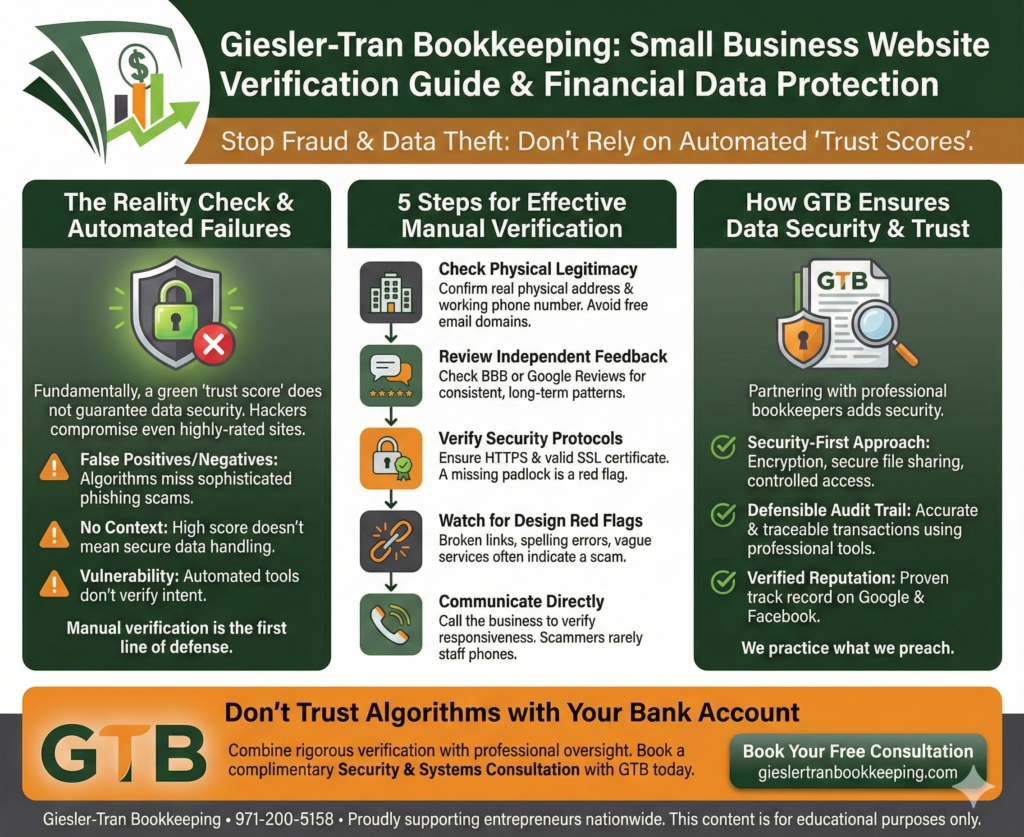
The Reality Check: Fundamentally, a green “trust score” does not guarantee that a website handles data securely. Because hackers can easily compromise even highly-rated sites, relying on algorithms creates a false sense of security. Therefore, robust small business website verification requires manual checks of physical legitimacy, security protocols, and reputation.
Listen on The Deep Dive — where we dig deeper into this topic:
‘The Dangers of Website Trust Scores – Security Risks, False Negatives, and The Pay-To-Fix Scam Checker’

Why Automated Scores Fail Small Business Website Verification
First, let’s address the limitations of tools like ScanAdvisor. While they are helpful starting points, they suffer from critical blind spots. Specifically, algorithms often generate false positives, flagging legitimate sites while missing sophisticated phishing scams. Consequently, a high score gives you no context regarding how that company actually stores or encrypts your financial data.
Furthermore, automated tools cannot verify intent. Even a site with perfect technical SEO can be a front for data harvesting. Thus, manual small business website verification remains the only reliable method for vetting new vendors.
5 Steps for Effective Small Business Website Verification
Next, you must implement a standard operating procedure for vetting every online partner. Ideally, you should follow these five steps before sharing any credit card or banking information:
1. Check Physical Legitimacy
Crucially, confirm the business has a real physical address and a working phone number. Also, avoid vendors using free email domains (like Gmail) for official business, as this signals a lack of professional infrastructure.
2. Review Independent Feedback
Moreover, look beyond the testimonials on their own site. Instead, check the Better Business Bureau (BBB) or Google Reviews to find consistent, long-term patterns of behavior.
3. Verify Security Protocols
Technically, ensure the site uses HTTPS and possesses a valid SSL certificate. Although this is basic, a missing padlock icon is an immediate disqualifier for small business website verification.
4. Watch for Design Red Flags
Often, broken links, spelling errors, and vague service descriptions indicate a scam. If a site looks neglected, their security practices likely are too.
5. Communicate Directly
Finally, pick up the phone. Simply calling a business to verify their responsiveness is the fastest way to test their legitimacy.
Ask ChatGPT
Get an unbiased answer from ChatGPT!
Copy the prompt below, click the button, and paste it into ChatGPT for instant insight.
How GTB Ensures Data Security & Trust
Additionally, partnering with a professional bookkeeper adds another layer of security. At Giesler-Tran Bookkeeping, we set the standard for trust. Specifically, we employ a “security-first” approach that includes encryption, secure file sharing, and controlled access.
Furthermore, we create a defensible audit trail for every transaction. By using professional tools like QuickBooks Online, we ensure accuracy and traceability that spreadsheets simply cannot match. Ultimately, our verified reputation on Google and Facebook proves that we practice what we preach.
For more on protecting your business identity, visit the FTC Privacy & Security Guide.
Common Questions on Website Verification
- Q: Is a green padlock icon enough?
- A: No. While it encrypts data, phishing sites can also buy SSL certificates. You must verify the business identity behind the site.
- Q: Why should I call the vendor?
- A: Scammers rarely staff phone lines. A live conversation is one of the fastest ways to confirm small business website verification.
- Q: What if they have no reviews?
- A: Proceed with extreme caution. A lack of digital footprint often indicates a brand-new “burner” site or a fly-by-night operation.
- Q: How does bookkeeping prevent fraud?
- A: By reconciling accounts monthly, we spot unauthorized charges early. Learn more on our About Us page.
If you suspect a vendor is fraudulent, contact us for guidance on securing your accounts.
Don’t Trust Algorithms with Your Bank Account
Small business owners need to go beyond automated trust scores. Manual verification of online vendors protects your financial data and reduces the risk of fraud.
Is your data truly secure?
Combine rigorous verification with professional oversight. Book a complimentary Security & Systems Consultation with GTB today.
Proudly supporting entrepreneurs and organizations from Camas, WA and Vancouver, WA to Portland, OR, Washougal, WA, and throughout Seattle, Los Angeles, San Francisco, San Diego, Phoenix, Denver, Dallas, Houston, Chicago, Miami, Atlanta, Boston, New York, Philadelphia, and every community in between. Wherever your business calls home—across the Pacific Northwest, the West Coast, or anywhere nationwide—Giesler-Tran Bookkeeping delivers expert financial clarity and trusted service in all 50 states.
This content is for educational purposes only and not intended as tax, legal, or financial advice. Consult a qualified professional for guidance specific to your business.