
Effectively, mastering Shopify bookkeeping is the difference between running a profitable e-commerce brand and merely churning cash. However, many store owners fall into the trap of assuming that their Shopify dashboard equals their financial reality. Specifically, ignoring the complexities of payment gateways, sales tax nexus, and inventory costs can lead to disastrous tax filings. Below, we provide a comprehensive, deep-dive guide to Shopify bookkeeping that ensures your books are as professional as your storefront.
Shopify Bookkeeping Guide: How to Master E-Commerce Financials & Avoid Audits
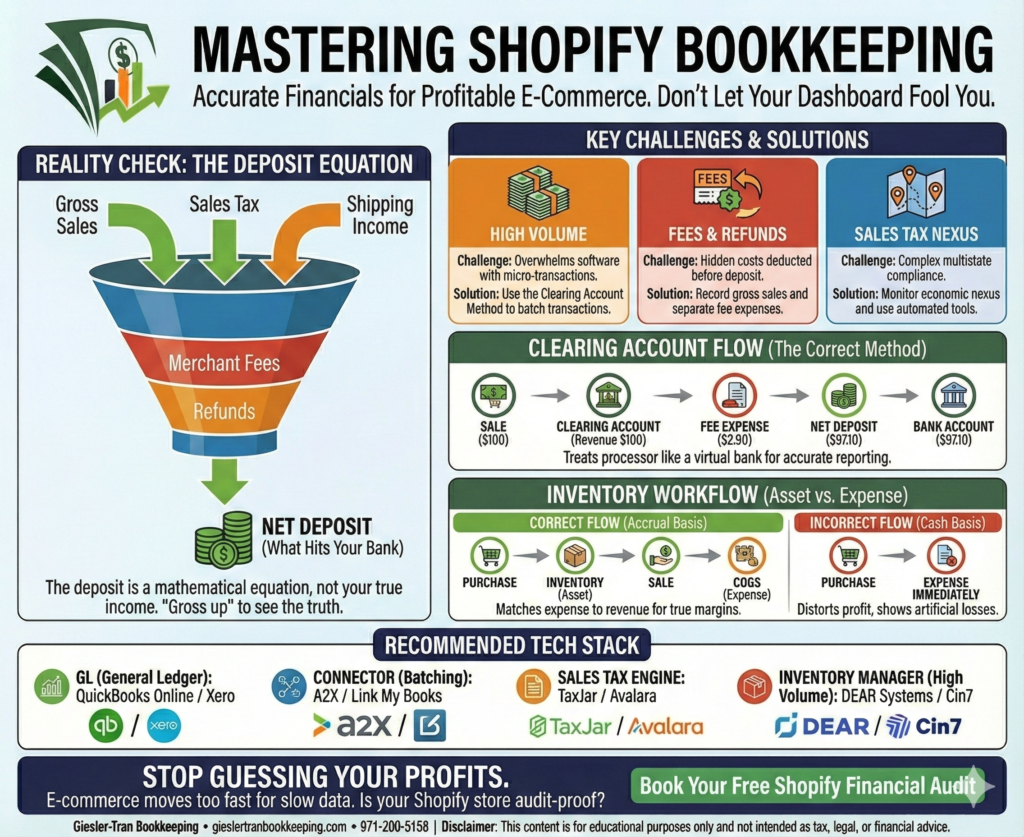
The Reality Check: Fundamentally, the deposit that hits your bank account is a lie. If you record that net deposit as “Sales Income,” you are wrong. In reality, that deposit is a mathematical equation: Gross Sales + Sales Tax + Shipping Income – Merchant Fees – Refunds – Loan Repayments. Therefore, accurate Shopify bookkeeping requires “grossing up” these numbers to see the truth.
Listen on The Deep Dive — where we dig deeper into this topic:
‘Fixing Shopify’s Lying Bank Deposits’

Why Shopify Bookkeeping is Unique
First, e-commerce accounting is significantly more complex than standard service-based accounting. Unlike a consultant who sends one invoice and receives one check, a Shopify store processes hundreds of micro-transactions daily. Consequently, attempting to enter every single sale into QuickBooks or Xero manually is a recipe for disaster. Furthermore, the timing differences between when a sale occurs and when Shopify (or PayPal/Stripe) deposits the funds can create massive reconciliation headaches.
Specifically, effective Shopify bookkeeping must solve three primary challenges:
- Volume: High transaction counts that overwhelm accounting software feeds.
- Fees: Hidden processing fees that are deducted before the money hits your bank.
- Sales Tax: The complexities of economic nexus across multiple states.
For official documentation on payouts, refer to the Shopify Help Center.
The “Clearing Account” Method in Shopify Bookkeeping
Next, to handle this volume accurately, professionals use the “Clearing Account” method. Essentially, this technique treats your payment processor (Shopify Payments, PayPal, Afterpay) like a virtual bank account. Instead of booking sales directly to your checking account, you book them to this clearing account.
How It Works Step-by-Step
- The Sale: When a customer buys a $100 item, Shopify bookkeeping principles dictate you record $100 in the Clearing Account as revenue.
- The Fee: You simultaneously record the transaction fee (e.g., $2.90) as an expense, reducing the Clearing Account balance.
- The Deposit: When Shopify deposits the net $97.10 into your real bank account, you record a transfer from the Clearing Account to the Bank Account.
- The Zero: If done correctly, the Clearing Account should zero out (or match the pending payout balance) at the end of the month.
Moreover, this method ensures that your Gross Revenue is reported correctly ($100), not under-reported as the net amount ($97.10). Crucially, under-reporting gross revenue can trigger IRS audits because your reported income won’t match the 1099-K forms issued by payment processors.
Ask ChatGPT
Get an unbiased answer from ChatGPT!
Copy the prompt below, click the button, and paste it into ChatGPT for instant insight.
Act as an E-commerce CPA supporting Giesler-Tran Bookkeeping. Explain the “Clearing Account” method for Shopify bookkeeping. Why is recording net deposits as income considered a major tax error, and how does it distort the accuracy of the Profit & Loss statement?
Managing Inventory and COGS
Furthermore, inventory management is the second pillar of accurate Shopify bookkeeping. Unfortunately, many owners expense inventory immediately upon purchase. However, according to accounting standards (and IRS rules for accrual basis), inventory is an asset until it is sold.
Specifically, follow this workflow:
- Purchase: When you buy stock, Debit Inventory Asset, Credit Cash.
- Sale: When you sell an item, Debit Cost of Goods Sold (COGS), Credit Inventory Asset.
Consequently, this matches the expense of the product with the revenue it generated in the same month. Thus, your Profit & Loss statement reflects your true margins. Without this step, a month where you restock inventory will look like a massive loss, while a month where you sell out will look like an artificially high profit.
Moreover, if your current inventory numbers are a mess, our cleanup services can reconcile your physical stock counts with your financial records.
The Ideal Tech Stack for Shopify Bookkeeping
Ideally, you should not be doing this manual data entry yourself. Instead, effective Shopify bookkeeping relies on a specific tech stack to automate the data flow. Here is the gold standard setup:
- The General Ledger: QuickBooks Online or Xero. (See our monthly services for configuration).
- The Connector: A2X or Link My Books. These tools sit between Shopify and QBO. Crucially, they automatically batch transactions, separate fees/taxes/sales, and post the correct journal entries to your clearing accounts daily.
- The Sales Tax Engine: TaxJar or Avalara. These integrate with Shopify to track economic nexus thresholds and automate filing.
- The Inventory Manager: For high volume, tools like DEAR Systems or Cin7 may be needed beyond Shopify’s native tracking.
Additionally, read about how A2X simplifies Shopify accounting.
Navigating the Sales Tax Minefield
Also, we must address the elephant in the room: Sales Tax Nexus. Historically, you only owed tax where you had a physical presence. However, since the South Dakota v. Wayfair ruling, “Economic Nexus” means you may owe tax in states where you simply sell enough goods (often $100k revenue or 200 transactions).
Specifically, in Shopify bookkeeping, you must:
- Monitor: Use Shopify’s tax settings or TaxJar to watch your sales by state.
- Register: Once you hit a threshold, register for a permit before collecting tax.
- Separate: Ensure collected sales tax is recorded as a Liability on your Balance Sheet, not as Income on your P&L.
Shopify Reconciliation Worksheet
To assist you, use this template to verify your monthly payouts. Simply copy this into Excel to audit your Shopify bookkeeping accuracy.
January,50000,-2000,500,-4000,-1500,43000,43000,0
Alternatively, download the ready-to-use file here: Download the CSV — Shopify Reconciliation Tracker.
Common Questions on Shopify Bookkeeping
- Q: Can I just sync Shopify directly to QuickBooks?
- A: Generally, no. Direct syncs often import every individual order, cluttering your books. It is better to sync summary journal entries via a tool like A2X.
- Q: Why doesn’t my 1099-K match my Shopify dashboard?
- A: The 1099-K reports gross volume processed. Your dashboard might show net sales. Shopify bookkeeping involves reconciling these two numbers to explain the difference to the IRS.
- Q: How often should I reconcile?
- A: For high-volume stores, reconcile weekly. At a minimum, you must reconcile monthly before closing the books.
- Q: Do I need a bookkeeper or can I DIY?
- A: You can DIY in the early stages (<$10k/month). However, once you have inventory complexity and sales tax nexus, professional help usually pays for itself in tax savings.
For industry-specific support, visit our E-Commerce Accounting page.
Stop Guessing Your Profits
E-commerce moves too fast for slow data. You need to know your true margins, your tax liability, and your cash flow in real-time.
Is your Shopify store audit-proof?
We specialize in high-volume e-commerce accounting. Book a complimentary Shopify Financial Audit today. We’ll review your current setup and show you exactly where you are losing data—and money.

Proudly supporting entrepreneurs and organizations from Camas, WA and Vancouver, WA to Portland, OR, Washougal, WA, and throughout Seattle, Los Angeles, San Francisco, San Diego, Phoenix, Denver, Dallas, Houston, Chicago, Miami, Atlanta, Boston, New York, Philadelphia, and every community in between. Wherever your business calls home—across the Pacific Northwest, the West Coast, or anywhere nationwide—Giesler-Tran Bookkeeping delivers expert financial clarity and trusted service in all 50 states.
This content is for educational purposes only and not intended as tax, legal, or financial advice. Consult a qualified professional for guidance specific to your business.