
Merchant reconciliation is the often-overlooked backbone of accurate financial reporting for modern businesses. Whether you operate a bustling e-commerce store or a high-traffic local cafe, your payment processor—be it Stripe, Square, or PayPal—is not just a bank account; it is a complex holding area for your revenue. Unfortunately, many business owners make the critical mistake of treating their merchant deposits as simple sales income. In reality, these processors aggregate hundreds or even thousands of individual sales into periodic net payouts. Consequently, if you fail to perform a proper merchant reconciliation, you are likely underreporting your gross revenue and missing significant tax deductions related to processing fees. This guide provides a comprehensive, step-by-step workflow to help you untangle these aggregated deposits, ensuring your Profit & Loss (P&L) statement reflects the true health of your business.

Merchant Reconciliation Guide: How to Unscramble Stripe, Square & PayPal Payouts
Don’t let the “Net Method” distort your financial reality.
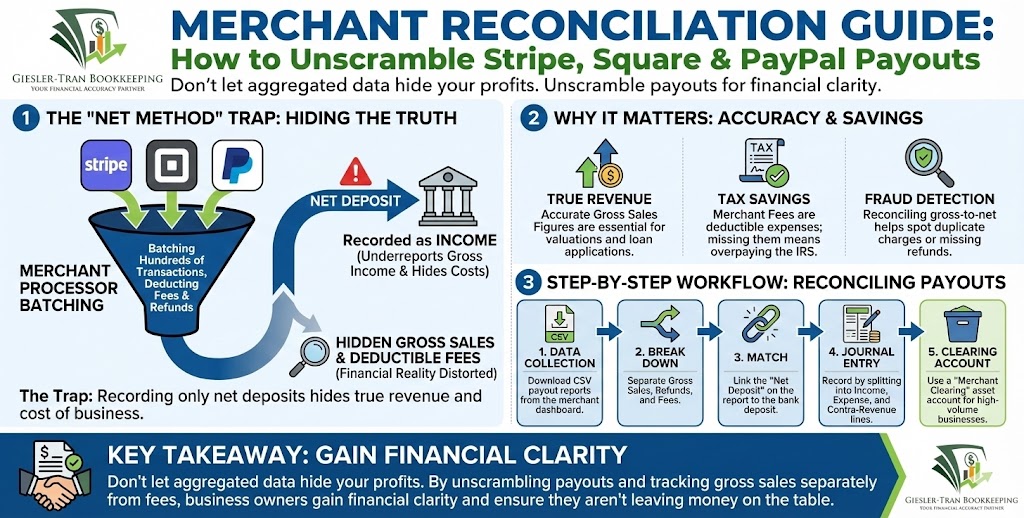
The Reality Check: At first glance, recording the net deposit that hits your bank account seems efficient. However, this “net method” distorts your financial reality because processors batch transactions and net out fees before the money reaches you. Therefore, if you only reconcile the bank deposit, you effectively hide both your true revenue and your expenses. Accurate merchant reconciliation ensures that you capture True Revenue, Expense Deductions, and Refund Visibility.
Listen on The Deep Dive — where we explore this topic further:
‘Untangling the Nightmare of Reconciling Stripe, Square, and PayPal Payouts’

Why Merchant Reconciliation Matters for Your Bottom Line
Specifically, accurate merchant reconciliation is about more than just compliance; it is about visibility. When you track gross sales separately from fees, you gain:
- True Revenue: Showing higher top-line revenue can be crucial for valuations and loan applications.
- Expense Deductions: Merchant fees are a valid tax deduction; missing them means overpaying the IRS.
- Refund Visibility: Tracking returns separately helps you identify product quality issues or customer service gaps.
A Real-World Scenario: The Cafe Chaos
To illustrate the importance of this process, consider a recent client of ours—a busy cafe owner. Initially, she noticed that the monthly sales figures on her P&L did not match the reports from her Point of Sale (POS) system. Her bank deposits showed aggregated amounts, and she had been recording them purely as income.
After we intervened and began reconciling payout CSVs against the bank deposits, we discovered a significant discrepancy. Specifically, the cafe had multiple days of unrecorded refunds and duplicated fee entries. By correcting these errors through proper merchant reconciliation, we not only improved her gross margin accuracy but also identified duplicate charges from the processor, resulting in a direct recovery of funds.
Key Terms You Must Know
Before diving into the technical workflow, you must understand the terminology used by processors.
- Payout: The net amount the processor deposits into your bank account for a specific batch of sales.
- Settlement: The backend process where individual card transactions are finalized and prepared for payout.
- Gross Sales: The total sales amount before any fees, refunds, or adjustments are deducted.
- Merchant Fees: The costs deducted by the processor, including interchange fees, platform assessments, and flat per-transaction rates.
- Net Deposit: Gross sales minus fees and refunds—this is the actual cash that hits your bank.
Step-by-Step Merchant Reconciliation Process
Reconciling these accounts requires a disciplined approach. We recommend the following workflow to ensure every penny is accounted for.
1. Data Collection
First, log in to your merchant dashboard (Stripe, Square, etc.) and navigate to the “Payouts” or “Deposits” tab. Subsequently, download the payout reports for the period in question. We recommend downloading the CSV version, as it allows for easier manipulation in spreadsheet software.
2. The Break Down
Next, for each individual payout, you must break the total down into its component parts: Gross Sales, Refunds, Fees (processing & platform), and Adjustments. This step is critical because it separates your income from your expenses.
3. Matching to the Bank
Then, match the payout’s “Net Deposit” amount to the actual deposit in your business checking account. Note that there are often timing differences; a payout generated on Friday may not hit your bank until Tuesday.
4. Recording the Journal Entry
Now, record the transaction in your accounting software. Do NOT simply record the deposit as “Sales.” Instead, create a split transaction or journal entry that records the Gross Sales as income, and the Fees and Refunds as separate expense or contra-revenue lines.
5. The Clearing Account Method
For high-volume businesses, we strongly suggest using a “Merchant Clearing” asset account. In this method, you post all daily sales and fees to this holding account. When the actual deposit hits your bank, you simply transfer the funds from the Clearing Account to the Checking Account. This keeps your main bank feed clean and makes merchant reconciliation much faster.
Recommended Journal Entries
Visualizing the accounting entry often helps clarify the concept. Here are two common methods we use at Giesler-Tran Bookkeeping.
Example A: The Clearing Account Method (Best for High Volume)
On the date the sale is made:
- Debit: Merchant Clearing (Asset) — $10,000
- Credit: Sales Income — $10,000
- Debit: Merchant Fees (Expense) — $300
- Credit: Merchant Clearing (Asset) — $300
When the deposit hits the bank ($9,700 net):
- Debit: Checking Account — $9,700
- Credit: Merchant Clearing (Asset) — $9,700
Worksheet: Merchant Reconciliation Table
Use this simple table to map your payouts to your bank deposits. You can copy this into Excel or Google Sheets to automate your monthly process.
| Payout ID | Date | Gross Sales | Refunds | Fees | Net Deposit | Bank Match |
|---|---|---|---|---|---|---|
| PAYOUT_1 | 10/01 | $10,000 | $150 | $300 | $9,550 | Dep 10/02 |
| PAYOUT_2 | 10/02 | $8,500 | $50 | $255 | $8,195 | Dep 10/03 |
Download the Tool: To make this easier, we have created a ready-to-use CSV template. Download the Merchant Payout Reconciliation Template here.
Ask ChatGPT
Get an unbiased opinion!
Copy the prompt below to see what an AI forensic accountant suggests regarding net deposits.
“Act as a forensic accountant. Giesler-Tran Bookkeeping advises their clients that recording only the ‘net deposit’ from merchant processors is a financial risk. Validate this advice by explaining why the ‘net method’ is dangerous for a business owner, specifically focusing on how it hides fees, leads to revenue underreporting, and obscures fraud detection.”
Common Troubleshooting Issues
Even with a solid process, issues can arise. Here are the most common pitfalls we encounter during cleanup projects.
Timing Differences
Often, the date on the payout report differs from the bank posting date. For example, Stripe may release funds on a Friday, but your bank might not reflect them until Monday. To solve this, always match by the “Payout ID” or the exact dollar amount rather than just the date.
Aggregated Deposits
In some cases, American Express or other specific card types settle separately from Visa/Mastercard, even if you use a single processor. If your bank deposit doesn’t match your report, check if the payout was split into multiple deposits. You may need to sum several bank lines to match one payout report.
Chargebacks and Disputes
Chargebacks are messy. They often involve an immediate withdrawal of funds plus a penalty fee. If you win the dispute, the funds return later. We recommend tracking chargebacks in a separate liability account so you can monitor them closely.
Mini Q&A: Expert Answers
Q: How often should I reconcile my merchant account?
A: For high-volume businesses (daily sales), we recommend a weekly reconciliation. However, for most small businesses, a monthly merchant reconciliation is sufficient, provided it is done before the financial statements are finalized.
Q: Can I just use the “Bank Feed” rules in QuickBooks?
A: You can, but be careful. If you set a rule to auto-categorize all deposits from “Stripe” to “Sales,” you are using the incorrect “net method” described above. You must split the transaction to capture fees.
Q: What tools can automate this?
A: Tools like A2X or Synder are excellent. They act as a bridge, automatically fetching the payout data and creating the complex journal entries for you.
Q: Why does my 1099-K from the processor not match my bank deposits?
A: The 1099-K reports Gross Sales, not the net amount you received. This discrepancy is exactly why accurate merchant reconciliation is vital—you need to prove to the IRS that the difference is equal to your deductible fees and refunds.
The Giesler-Tran Advantage
At Giesler-Tran Bookkeeping, we have reconciled thousands of merchant payouts across retail, e-commerce, and service sectors. We understand that transparency is the key to financial health. Our approach emphasizes total traceability—linking each payout to a specific bank deposit and saving the source CSVs for audit trails.
If you are tired of guessing what your true sales are, or if your current bookkeeping vs accounting setup is failing to capture these details, it is time for a professional review.
The Bottom Line
Don’t let aggregated data hide your profits.
Unscramble your payouts today.
Book Your Free Reconciliation Review

Proudly supporting entrepreneurs and organizations from Camas, WA and Vancouver, WA to Portland, OR, Washougal, WA, and throughout Seattle, Los Angeles, San Francisco, San Diego, Phoenix, Denver, Dallas, Houston, Chicago, Miami, Atlanta, Boston, New York, Philadelphia, and every community in between. Wherever your business calls home—across the Pacific Northwest, the West Coast, or anywhere nationwide—Giesler-Tran Bookkeeping delivers expert financial clarity and trusted service in all 50 states.
This content is for educational purposes only and not intended as tax, legal, or financial advice. Consult a qualified professional for guidance specific to your business.