
Effectively, nonprofit bookkeeping grant tracking is the ultimate test of an organization’s financial discipline. However, you cannot successfully fulfill your mission if you do not know exactly which dollars are restricted and which are available for operations. Specifically, implementing robust nonprofit bookkeeping grant tracking throughout the year is the only way to ensure compliance and donor trust. Below, we outline how to track restricted funds, tag grants, and maintain audit-ready documentation.
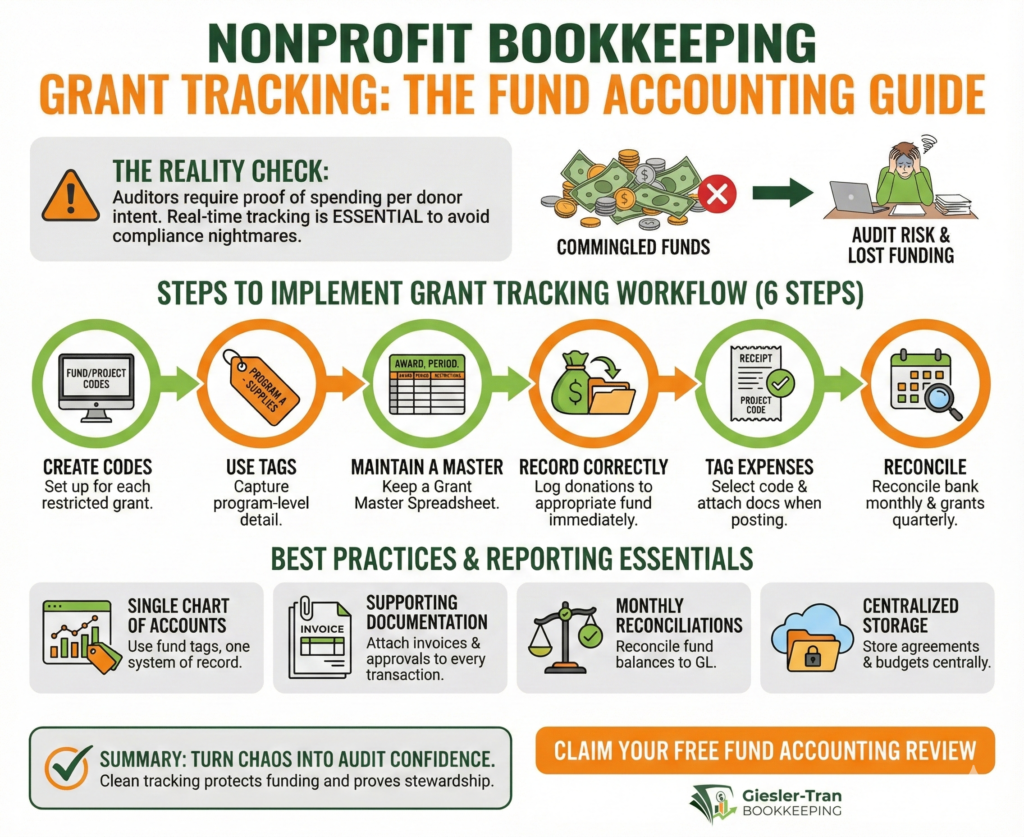
Nonprofit Bookkeeping Grant Tracking: The Fund Accounting Guide
Clear tracking makes compliance painless.
The Reality Check: Fundamentally, auditors require you to prove that you spent grant money exactly how the donor intended. If you wait until the end of the year to separate these funds, you will likely face a compliance nightmare. Therefore, real-time nonprofit bookkeeping grant tracking is not optional; it is essential.
Listen on The Deep Dive — where we dig deeper into this topic:
‘Restricted vs. Unrestricted Funds—The Nonprofit Fund Accounting System’

Why Nonprofit Bookkeeping Grant Tracking Matters
First, nonprofits must demonstrate that they honored donor restrictions and grant terms. Specifically, fund-level reporting is a requirement for both internal oversight and external auditors. Consequently, poor nonprofit bookkeeping grant tracking often leads to lost funding, difficult audit findings, and damaged donor relationships. By integrating restricted vs unrestricted funds tracking into your monthly bookkeeping, you ensure your year-end is simply a review, not a rescue mission.
For authoritative guidance on this, the National Council of Nonprofits offers excellent resources on financial transparency.
A Real-World Grant Tracking Story
Consider a small arts nonprofit that once mixed restricted grant funds into general operations. Later, when the funder requested documentation, the organization could not produce supporting invoices. As a result, the grantor requested repayment. To fix this, we rebuilt their nonprofit bookkeeping grant tracking system, implemented tags for each award, and produced donor-facing reports. Ultimately, that simple change prevented future misuse and strengthened funder trust.
Steps to Implement Nonprofit Bookkeeping Grant Tracking
Next, follow these steps to ensure your data is ready for audits. Ideally, you should implement this nonprofit bookkeeping grant tracking workflow immediately:
- Create codes: Set up fund/project codes in your accounting system for each restricted grant and major program.
- Use tags: Utilize classes, locations, or tags to capture program-level detail (e.g., Program A – Supplies).
- Maintain a Master: Keep a Grant Master Spreadsheet with columns for Award Amount, Period, and Restrictions.
- Record correctly: Log donations to the appropriate fund immediately upon receipt.
- Tag expenses: Require staff to select the project code and attach supporting docs when posting expenses.
- Reconcile: Finally, reconcile bank accounts monthly and grant schedules quarterly to avoid surprises.
Ask ChatGPT
Get an unbiased answer from ChatGPT!
Copy the prompt below, click the button, and paste it into ChatGPT for instant insight.
Act as a Nonprofit Auditor. Explain why ineffective nonprofit bookkeeping, poor grant tracking, and commingled funds create compliance risks. Describe how using a Grant Master Spreadsheet mitigates these issues — and how Giesler-Tran Bookkeeping helps nonprofits maintain organized, accurate, and audit-ready records to protect compliance and donor trust.
The Master Index for Grant Tracking
To assist you, use this table to track active grants. Simply copy this into a spreadsheet to keep your nonprofit bookkeeping grant tracking organized.
Culture Grant – Fund-Culture-2025,25000,Jan 2025 – Dec 2025,Quarterly,Program events & stipends,City Arts Council,Agreement uploaded
Federal Grant X – Fund-FedX-2024,120000,Oct 2024 – Sep 2025,Monthly,Program delivery & supplies,Federal Agency,Reporting templates required
Alternatively, download the ready-to-use file here: Download the CSV — NonProfit Grant Master.
Moreover, if your current grant list is incomplete or disorganized, our cleanup services can help reconstruct your records before the audit begins.
Best Practices for Nonprofit Bookkeeping Grant Tracking
Furthermore, establishing internal controls is key. Specifically, we recommend:
- Single Chart of Accounts: Use fund tags rather than separate ledgers to keep one system of record.
- Supporting Documentation: Attach invoices and approvals to every restricted transaction.
- Monthly Reconciliations: Reconcile fund balances to the GL monthly.
- Centralized Storage: Store grant agreements and budgets in a centralized folder.
For more technical details on fund accounting, Propel Nonprofits provides extensive guides.
Reporting Essentials for Grant Tracking
Finally, ensure you can produce these schedules to stay audit-ready:
- Grant-by-grant revenue & expense schedule.
- Fund balance schedule (restricted vs. unrestricted).
- Donor ledger and receipts.
- One-page narrative explaining major reconciling items.
Pitfalls That Derail Nonprofit Bookkeeping Grant Tracking
Ultimately, avoid these common mistakes: mixing restricted funds with operating cash, missing reporting deadlines, or losing grant agreements. Instead, use the tools provided above to keep your mission secure.
Turn Grant Tracking Chaos into Audit Confidence
Don’t let a disorganized grant list risk your reputation or drain your budget. A clean audit protects your funding and proves your stewardship.
You don’t have to guess if you’re ready.
We offer a complimentary Fund Accounting Review where we assess your current system before the auditors do. We’ll help you spot compliance gaps, organize your restricted funds, and hand you a clear roadmap to a clean audit.
Claim Your Free Fund Accounting Review
Proudly supporting entrepreneurs and organizations from Camas, WA and Vancouver, WA to Portland, OR, Washougal, WA, and throughout Seattle, Los Angeles, San Francisco, San Diego, Phoenix, Denver, Dallas, Houston, Chicago, Miami, Atlanta, Boston, New York, Philadelphia, and every community in between. Wherever your business calls home—across the Pacific Northwest, the West Coast, or anywhere nationwide—Giesler-Tran Bookkeeping delivers expert financial clarity and trusted service in all 50 states.
This content is for educational purposes only and not intended as tax, legal, or financial advice. Consult a qualified professional for guidance specific to your business.